English
 Italiano
 Українська
 Русский
 Español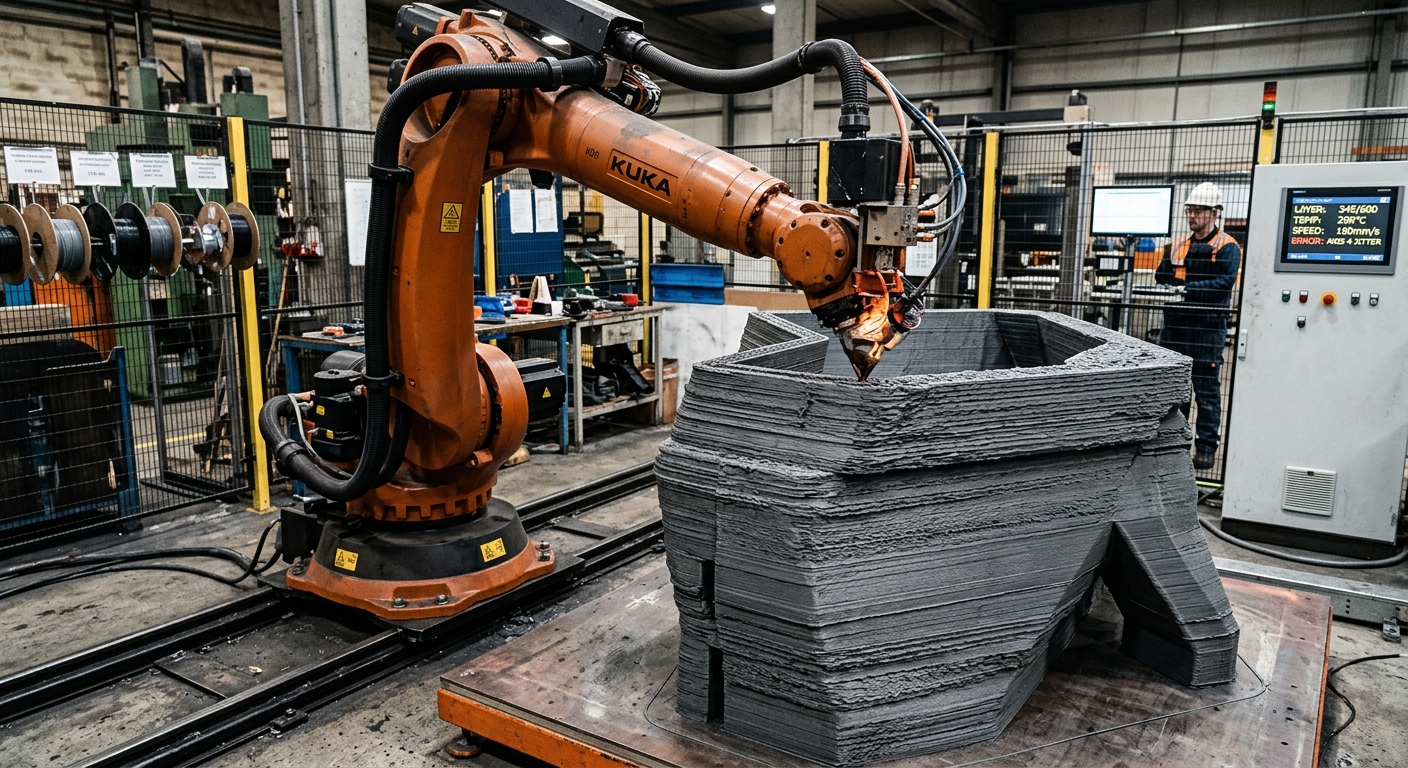

Robotic layer shifting occurs when newly deposited material no longer aligns with the intended position of previous layers. In large-format 3D printing, this problem may result from robot positioning errors, nozzle collisions, material deformation, unstable extrusion, or movement of the printed structure. Identifying the mechanism matters because different defects can produce similar visible results.
Unlike conventional desktop printers, industrial robotic systems use articulated arms, larger extrusion equipment, and complex toolpaths. The robot must coordinate its movements with material delivery while maintaining the correct nozzle position and orientation. Errors in calibration, mechanical stability, or process synchronization can affect the relationship between successive layers.
However, apparent layer shifting does not always indicate that the robot has lost position. Thermal contraction, poor material support, and inconsistent bead geometry can also create visible offsets. Effective troubleshooting begins by separating actual positioning errors from changes in the printed material. This article explains the main causes, how to recognize their symptoms, and which technical checks help prevent repeated defects.
What is robotic layer shifting?
Robotic layer shifting describes a positional mismatch between deposited layers and their intended geometry. In industrial additive manufacturing, robotic layer shifting may appear as a sudden lateral displacement, an uneven wall, or a progressive deviation from the programmed shape.
True positioning errors versus material deformation
A true positioning error occurs when the actual nozzle path differs from its intended location. Material deformation occurs when the robot follows the correct path but the printed structure changes shape.
These conditions require different corrections. Motion errors require investigation of the robot, calibration, and control system. Material-related deviations require evaluation of extrusion conditions, cooling, and structural support.
How robot positioning errors affect layer alignment
Tool center point calibration
The tool center point (TCP) defines the reference position used to control the extrusion nozzle. An incorrect TCP can produce deposition errors, especially when the robot changes orientation. The resulting deviation depends on the tool geometry and the calibration error.
Robot stiffness and external loads
Industrial robots deform elastically under load. The amount of deflection depends on robot configuration, payload, acceleration, and external forces. Heavy extruders or unfavorable arm positions can increase positioning deviations during printing.
Mechanical wear, mounting instability, and calibration problems may also reduce process accuracy. Robotic layer shifting associated with positioning errors requires comparing the programmed trajectory with independently measured nozzle positions to identify the source of displacement.
Why nozzle collisions cause layer shifting
Incorrect nozzle clearance
Nozzle clearance is the distance between the extrusion outlet and the deposition surface. When this gap becomes too small, the nozzle may contact previously deposited material. Depending on the forces involved, contact can deform a bead or disturb the printed structure.
Unexpected geometry during printing
Warping, excessive bead height, and material accumulation can produce obstacles that were absent from the original toolpath. A collision may occur even when the programmed robot trajectory is correct.
In multi-axis printing, nozzle orientation introduces additional clearance requirements. The article on nozzle orientation in non-planar robotic 3D printing explains how tool angles, TCP accuracy, and nearby geometry influence deposition and collision risks.
How extrusion instability affects layer geometry
Variations in material flow
Material flow must remain compatible with the robot’s travel speed and the required bead dimensions. Excessive flow creates wider or taller deposits. Insufficient flow produces gaps, narrow beads, and inconsistent support for subsequent layers.
Synchronization between robot and extruder
Changes in robot velocity require suitable coordination with extrusion output. Poor synchronization during acceleration, deceleration, or corner transitions can cause localized material accumulation. These deposits may interfere with later nozzle passes.
For a closer examination of these mechanisms, the article on feed pulsation defects in large-format robotic printing explains how fluctuating material delivery affects bead dimensions and deposited geometry.
How temperature causes apparent layer shifting
Thermal contraction and warping
Thermoplastic materials contract during cooling. Uneven temperature distribution can generate internal stresses that deform printed walls or lift sections from the build surface. Consequently, the actual deposition surface may differ from the programmed geometry.
Insufficient cooling between layers
When a previously deposited layer remains too soft, additional material can compress or displace it. Conversely, excessive cooling may weaken interlayer bonding, depending on the polymer and process conditions.
The article on interlayer cooling in large-format polymer 3D printing examines the relationship between temperature, dimensional stability, bonding, and shape retention. These factors should be considered before changing robot calibration to correct apparent shifting.
How the printing structure influences stability
Build platform movement
The build platform must remain stable throughout deposition. Inadequate fastening, thermal expansion, or movement of supporting fixtures can change the position of the printed component relative to the robot.
This possibility becomes especially relevant during long production cycles. Checking reference points on the platform before and after printing can help identify unwanted movement.
Unsupported walls and complex geometries
Tall, narrow walls and unsupported sections may deform under their own weight or the load of subsequent deposits. The risk depends on material stiffness, temperature, bead dimensions, and printing sequence.
Additional support, modified deposition paths, or adjusted cooling periods may improve geometric stability. These changes should be validated with representative test pieces before implementation in production.
How to troubleshoot robotic layer shifting
Troubleshooting robotic layer shifting requires comparing the programmed trajectory, actual nozzle movement, and resulting material geometry. Operators should identify when the defect first appeared and whether it coincided with a specific robot position, extrusion transition, or temperature condition.
The following eight checks provide a practical inspection sequence:
- Document the displacement: Record its direction, location, affected layers, and whether the offset appears suddenly or progressively.
- Verify TCP calibration: Confirm the nozzle reference point and examine errors associated with changes in tool orientation.
- Inspect robot mounting: Check pedestal stability, fastening conditions, and visible mechanical abnormalities.
- Review collision events: Examine nozzle clearance, raised material, and recorded controller alarms.
- Check extrusion stability: Compare material output with robot speed and inspect irregular bead dimensions.
- Evaluate thermal conditions: Monitor interlayer temperature, cooling time, and visible deformation.
- Inspect the build platform: Verify fixture stability, surface adhesion, and movement of the printed structure.
- Repeat a controlled test: Change one relevant parameter at a time and compare the resulting geometry.
Recorded position data, process logs, photographs, and dimensional measurements help distinguish repeatable defects from isolated events. Diagnosis should precede parameter adjustments because reducing robot speed alone will not correct every source of displacement.
How to prevent layer shifting during production
Preventing robotic layer shifting begins with a validated relationship between robot motion, extrusion output, material temperature, and deposited geometry. Calibration should be checked after modifications to tooling, mounting arrangements, or process configurations that may affect the TCP.
For production applications, monitoring can combine robot status, extrusion signals, temperature measurements, and dimensional inspection. The available measurements depend on the equipment, so inspection methods should be selected according to the failure mechanisms being investigated.
Safety controls must remain effective during troubleshooting. The OSHA technical guidance on industrial safety hazards provides broader context for evaluating workplace hazards. Automated motion and hot extrusion equipment require appropriate safeguards and operating procedures.
When recurring alignment defects involve several subsystems, contact Robotic Hi-Tech Solutions to discuss robotic printing integration, motion calibration, extrusion coordination, and process validation requirements.
FAQ
What is the most common cause of robotic layer shifting?
There is no universal cause. Positioning errors, nozzle collisions, material deformation, and platform movement can produce similar symptoms. The first diagnostic step is identifying whether the nozzle or deposited material changed position.
Can incorrect TCP calibration cause layer shifting?
Yes. Incorrect TCP calibration can produce deposition-position errors, particularly during changes in nozzle orientation. However, a constant calibration offset is different from a sudden shift during printing.
Does robot speed affect layer alignment?
Robot speed influences dynamic loading and material deposition. Excessive acceleration or poor synchronization with extrusion output may create deviations. Suitable settings depend on the robot, tooling, and process.
Can temperature changes move printed layers?
Temperature changes can cause thermal contraction, warping, or insufficient structural support. These effects can create apparent layer displacement even when the robot follows its programmed trajectory.
How can operators identify a nozzle collision?
Inspect the printed surface for impact marks, displaced material, or abnormal bead accumulation. Review controller alarms and compare nozzle clearance with the actual geometry before repeating the operation.
Can extrusion flow variations cause layer shifting?
Flow variations can create uneven deposits that resemble shifting or interfere with later layers. They do not necessarily indicate a robot positioning error. Comparing bead dimensions with motion data helps distinguish the causes.
Should operators recalibrate the robot after every shifting defect?
No. Recalibration is appropriate when evidence indicates a calibration problem. First inspect material deformation, nozzle clearance, fixtures, and extrusion behavior to avoid unnecessary changes.
How can recurring layer shifting be prevented?
Use verified calibration, stable fixtures, suitable cooling conditions, consistent extrusion, and validated toolpaths. Record process deviations and use repeatable tests to identify the parameters responsible for recurring defects.