English
 Italiano
 Українська
 Русский
 Español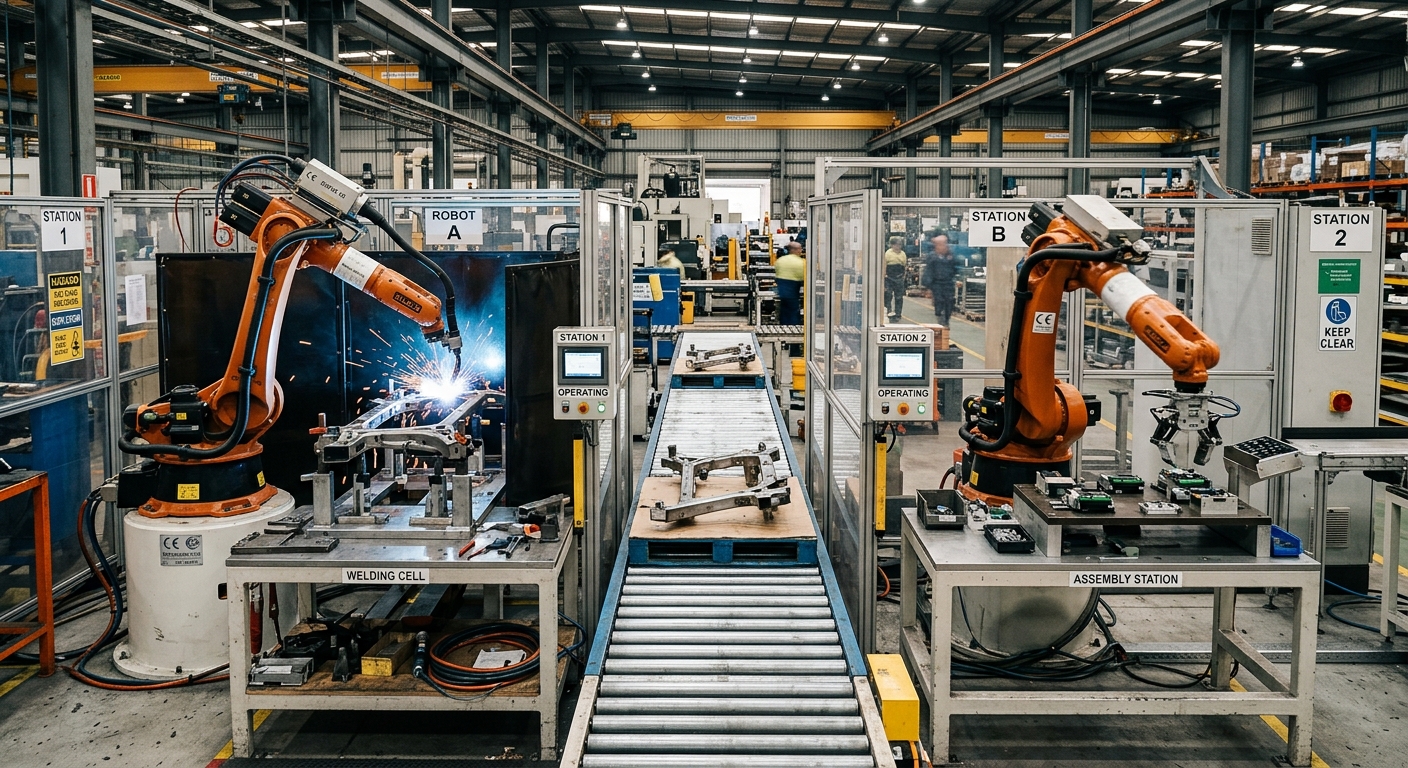

Multi-robot cells prevent interference by defining where each robot may move, controlling access to shared space and checking what happens when a movement or handoff fails. Two robots can complete their individual programs correctly and still collide if their tools, carried parts, or recovery paths occupy the same area at the same time. Collision prevention therefore depends on the behavior of the complete cell, not only on each robot’s path.
The first step is to identify every overlap between the robots’ possible movements. Designers then decide whether to remove the overlap through layout and path changes or coordinate access when sharing is necessary. The permitted sequence must account for normal production, manual operation, stops, and restarts.
This article explains how to define shared zones, grant and release access, verify clearances, and test fault conditions. It also separates production coordination from safeguards intended to protect people. Both need attention, but a signal that schedules robot movements should not be assumed to provide a safety function.
Where can interference occur in multi-robot cells?
Overlapping working envelopes
A robot’s working envelope describes the space its arm can reach, but the bare arm is only part of the collision picture. The end effector, a gripped part, hoses, and cables can extend into another robot’s path. A fixture or open machine door may narrow the available clearance further. Review the occupied space throughout each movement, including approach and withdrawal.
Shared processes and handoffs
Overlap is often intentional at a transfer station, common fixture, or inspection point. In these cases, the question is who may enter, under what conditions, and when the area becomes available again. A handoff needs a defined position and sequence; simply telling one robot to wait for a fixed time does not confirm that the other has cleared the space.
How should a shared zone be defined?
In multi-robot cells, define each shared zone around the actual volume needed for the task, including the tool and workpiece at their relevant orientations. Its boundaries should allow for the approach, task, and exit movements. If one large zone makes the process wait unnecessarily, smaller zones may help, provided their boundaries and transitions remain clear to the control system and operators.
Document which robots and other equipment can occupy each zone. A positioner, conveyor, or moving fixture may create interference even when both robot arms appear separated. The article on working envelope validation in robotic milling cells explains how tool geometry, fixtures and surrounding equipment affect clearance and collision analysis.
How do robots coordinate access?
Permission and occupancy signals
In multi-robot cells, a common approach is to require permission before a robot enters a shared zone. The controlling logic grants access only when the zone is available, records its occupancy and prevents a conflicting request from proceeding. Permission should remain associated with the robot until its full occupied volume has left the zone, rather than ending as soon as its tool center point crosses a boundary.
Sequencing and deadlocks
Shared-zone logic in multi-robot cells also needs an order of operations. If robot A holds one zone while requesting a second, and robot B holds that second zone while requesting the first, both can wait indefinitely. Define a consistent acquisition order or a sequence that prevents this condition. Test simultaneous requests, delayed signals, and a robot that stops while holding permission.
Cycle-time changes can expose weak coordination. A faster motion, a delayed machine response, or a revised path can alter when robots request access. Treat zone permissions as part of the documented cell program, so a production change triggers a review of the sequence as well as the path. The guide to robot program version control explains how to document changes and identify approved production configurations.
What can path planning prevent?
Separation before scheduling
Where practical, assign robots separate approaches or different sides of a fixture. Moving a path outside the other robot’s occupied volume removes a scheduling dependency for that movement. Separation can also make troubleshooting easier because fewer motions require permission. Check the complete path, including intermediate movements, rather than comparing only the start and end positions.
Simulation and real-cell checks
A simulation model of multi-robot cells can reveal geometric overlaps and sequence conflicts before installation. Its findings depend on the accuracy of the robot, tooling, fixtures, and programmed motions represented. On the physical cell, verify clearances at controlled speeds using the site’s commissioning procedures. Pay particular attention to carried-part variation, cable movement, and positions reached after a stop.
For applications with a common workpiece or moving equipment, revisit the layout whenever tooling or process steps change. A path that cleared the original fixture may interfere with a replacement clamp or a different part orientation. The robot applications articles provide additional examples of how process requirements shape cell design.
What happens when a robot stops in a shared zone?
In multi-robot cells, a stopped robot may still occupy a shared zone. The control sequence should retain that occupancy until its position and the conditions for release are confirmed. Do not infer that a zone is clear from the absence of a motion command or from elapsed time. Power loss, communication faults, and interrupted transfers need defined responses.
Restart deserves its own procedure. Before automatic movement resumes, the cell must establish where each robot, tool, and part is, which permissions remain valid, and whether the intended sequence can continue. Manual recovery may involve different paths from normal production. Those paths should be reviewed for interference and included in the applicable operating and safety procedures.
How are people protected around the cell?
Robot-to-robot coordination controls production movements; protecting people requires a risk assessment and suitable safeguards for the complete application. Access points, maintenance tasks, unexpected startup, and the reach of all robots need consideration. OSHA’s industrial robot safety guidance describes the role of application risk assessment and safeguarding in evaluating these hazards.
The chosen safeguards must be validated for their intended function. For example, a production controller’s “zone occupied” bit should not be treated as a personnel protection measure merely because it pauses another robot. Keep the purpose of each control clear in the cell documentation, and review changes to equipment, access, or operating modes with the people responsible for safety validation.
What should be checked before production?
Use the following checks during design review and commissioning. Record the result and the program or equipment version tested so later changes can be compared with the approved cell configuration.
- Map each robot’s arm, tool, carried part, and cable space through its full programmed motion.
- Identify every overlap with another robot, fixture, positioner, or moving machine component.
- Define the entry, occupancy, and release condition for each shared zone.
- Test simultaneous zone requests and confirm which robot receives permission.
- Check whether two robots can each hold a zone while waiting for the other.
- Stop a robot inside each shared zone and verify that the other cannot enter.
- Test recovery after power, communication, and process interruptions under controlled conditions.
- Repeat clearance and sequence checks after changes to tooling, paths, parts, or cycle timing.
How should the cell be maintained after commissioning?
For multi-robot cells, keep a controlled record of zone boundaries, permission logic, robot programs, and recovery instructions. When a change is proposed, identify which paths and shared areas it affects before releasing the revised cell. Alarm history can help locate recurring waits or interrupted handoffs, but it does not replace direct checks of clearance and control behavior.
If a new cell or a substantial modification is being planned, provide the integrator with the process sequence, tooling dimensions, part variations, and access requirements early. These details allow the shared-zone strategy to be assessed alongside layout and cycle time. To discuss a specific application, contact Robotic Hi-Tech Solutions with the proposed cell layout and operating sequence.
FAQ
Can two robots enter a shared zone at the same time?
Only if the zone design and validated sequence permit their simultaneous occupied volumes to remain clear of one another. Otherwise, access should be exclusive.
Is a fixed time delay enough to prevent collisions?
No. A delay does not establish that a robot has completed its motion or left the zone after a fault or process interruption.
Does a collision-free simulation prove the installed cell is clear?
No. Check the physical tooling, parts, fixtures, and cables, and validate the installed programs and control sequence.
When should a robot release its zone permission?
After its complete occupied volume has cleared the defined zone and the control system has confirmed the release condition.
What is a shared-zone deadlock?
It occurs when robots wait for permissions held by one another, leaving the sequence unable to progress without intervention or defined recovery logic.
Do safety fences replace robot-to-robot coordination?
No. Perimeter safeguarding addresses access by people; robots within the guarded cell still need their movements coordinated.
Should manual recovery use the normal zone sequence?
Recovery needs its own reviewed procedure. The appropriate permissions depend on the robot positions, operating mode, and task being performed.
When should shared zones be reviewed again?
Review them after changes to programs, tooling, fixtures, part geometry, equipment positions or operating sequences that could affect occupied space.